
Shared Channels
Plain supports helping your customers via Microsoft Team's Shared Channels.
Getting Started
Providing support via Team's "Shared" channels requires you add the application to your shared channel specifically. Depending on your Azure security settings, this might require a Teams administrator.
Shared channels requires version 1.0.8 or greater of our Teams bot. You can check which version you're on in the Teams Admin Portal. If you need to update, see our updating docs.
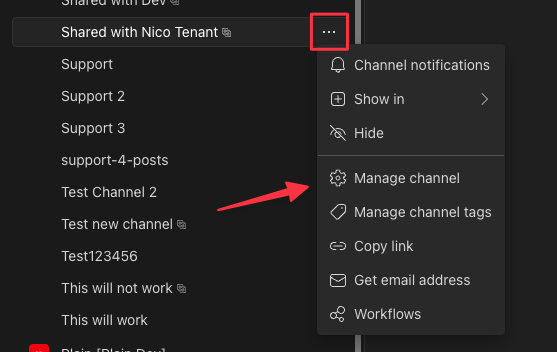
Add the Plain bot to your shared channel by clicking on the overflow menu of your shared channel of choice and selecting "Manage channel".
Go to the "Apps" tab (this might be hidden behind the "+" in the manage channel header) and check the box next to "Plain" and select "Add" to add the selected application to the channel. Ensure the "Added to Channel" column says "Yes".
Now any new threads / top-level messages authored in that shared channel by a user who is not also a Plain user (i.e. by anyone who is not one of your support-agents) will trigger a new Plain thread.
Troubleshooting
If you cannot invite users from a particular Azure tenant of one of your customers to your shared channel, ensure that Azure B2B Direct Connect security settings are setup correctly in both your and your partners Azure Entra settings. They both must be set to allow one another. See the Teams documentation for further info.
If messages don't appear in Plain from your shared Teams channel, you may need to reauthorize the Plain workspace integration to ensure all required scopes are approved.
This can be done by going into the Plain channel settings for Microsoft Teams and clicking "Disconnect" and then "Reconnect" next to your workspace integration. When you select "Reconnect" you will need to signin to Microsoft Teams using a Teams Administrator Microsoft account.
Clicking "Disconnect" will not result in any threads being deleted or losing any existing data. However, while you are disconnected Plain will not pick up any new Teams messages. Logging back in should only take a few seconds and our backfill logic will pick up any messages in existing threads that may have been missed.